
DXFTagExtractor
A focused Windows utility that reads attributed INSERT blocks from DXF drawings, highlights duplicate values and exports an ordered Excel workbook.
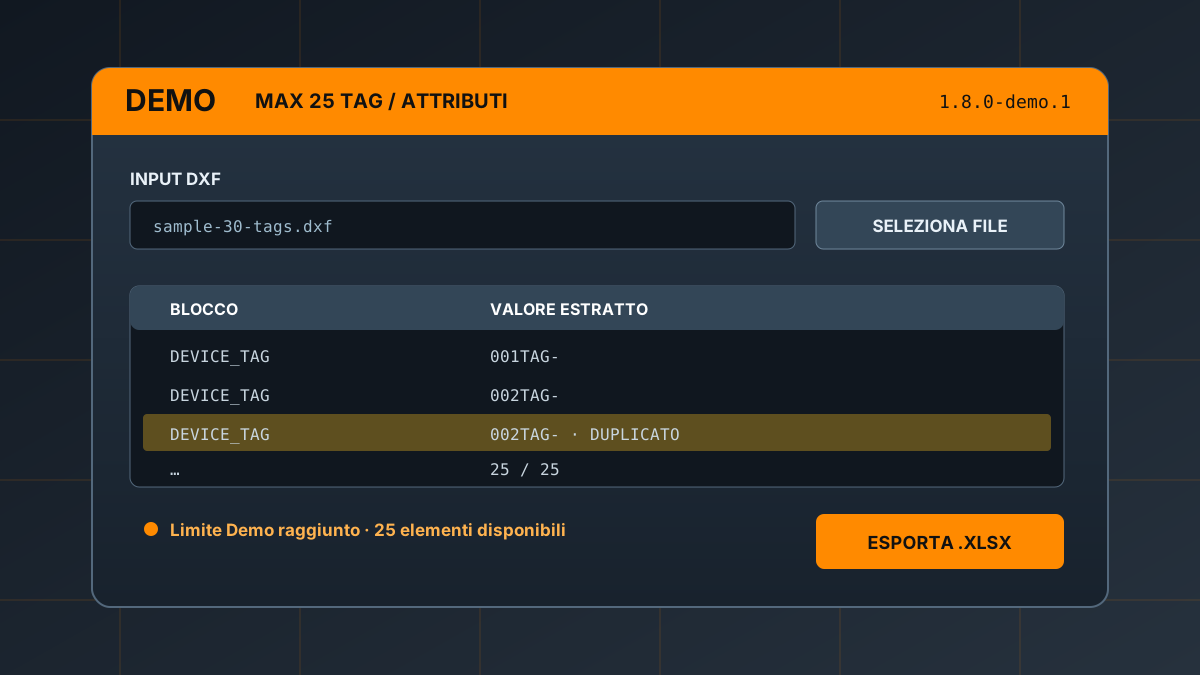
// Workflow
From attributed drawings to a verifiable workbook
Multiple DXF files
Select one or more drawings in a single operation. Native DWG files are not supported.
Attributed blocks
Reads INSERT entities carrying attributes and associates each extracted value with its block name.
Duplicate detection
Repeated combined values are highlighted in the preview before the export is created.
Excel .xlsx
Creates an ordered workbook with headers, filter and the block/value pairs available in the Demo.
// Demo vs Full RC1
A representative workflow with one explicit limit
| Capability | Demo 1.8.0-demo.1 | Full 1.8.0 RC1 |
|---|---|---|
| Multiple DXF input | ✓ | ✓ |
| Preview and duplicate highlighting | ✓ | ✓ |
| Excel export | ✓ | ✓ |
| Rows shown and exported per operation | Maximum 25 total | No artificial Demo limit |
| Public availability | Evaluation prerelease | Not distributed; RC1 in development |
The absence of the Demo cap in the Full RC1 does not imply unlimited technical capacity. Actual performance depends on drawing size and complexity.
// Reproducible test
The package includes a 30-tag synthetic DXF
Immediate verification
Open the supplied sample, generate the preview and confirm that the application reports 25/25 while warning that more elements exist.
Cumulative cap
Automated tests also cover multiple input files: splitting the drawings does not increase the 25-row allowance for one operation.
// Prerelease
A transparent evaluation package
DXFTagExtractor-Demo-1.8.0-demo.1-windows-unsigned.zip
Portable Windows archive
28,226,025 bytes
SHA-256
0238f6004cc7…09d23ec9
Verified after public download
Proprietary evaluation
Copyright belongs to Fabio De Deo. Modification, redistribution, commercial use and limit bypass are not authorised.
Unsigned and local
Windows may display SmartScreen. Processing is offline, without accounts, telemetry or file transmission.